

Today I updated one of my old project from PHP 7.1 to PHP 8.1. After this upgrade I faced with a problem in GeoIP module usage as it was not available OOTB as a part of PHP installation..
When I tried to install it like the next I saw an error
$ sudo apt install php-geoip
Reading package lists... Done
Building dependency tree... Done
Reading state information... Done
Package php-geoip is not available, but is referred to by another package.
This may mean that the package is missing, has been obsoleted, or
is only available from another source

E: Package 'php-geoip' has no installation candidate

$ sudo apt-cache search php | grep geoip
>> Nothing
This happened because the module was obsolete and was removed.
I fixed this as follow.
First of all I installed GeoIP package and utility to updated GeoIp databases
$ sudo apt install geoip-bin geoip-database geoipupdateThen, if you trigger the update you will see next error
$ sudo geoipupdate -v
error loading configuration file /etc/GeoIP.conf: the AccountID option is required
To resolve it, you need to go to MaxMind website and create free account, then you need to generate this file. Manual for this operation can be found here
– https://dev.maxmind.com/geoip/geolite2-free-geolocation-data
After you register you account you should generate new license key.
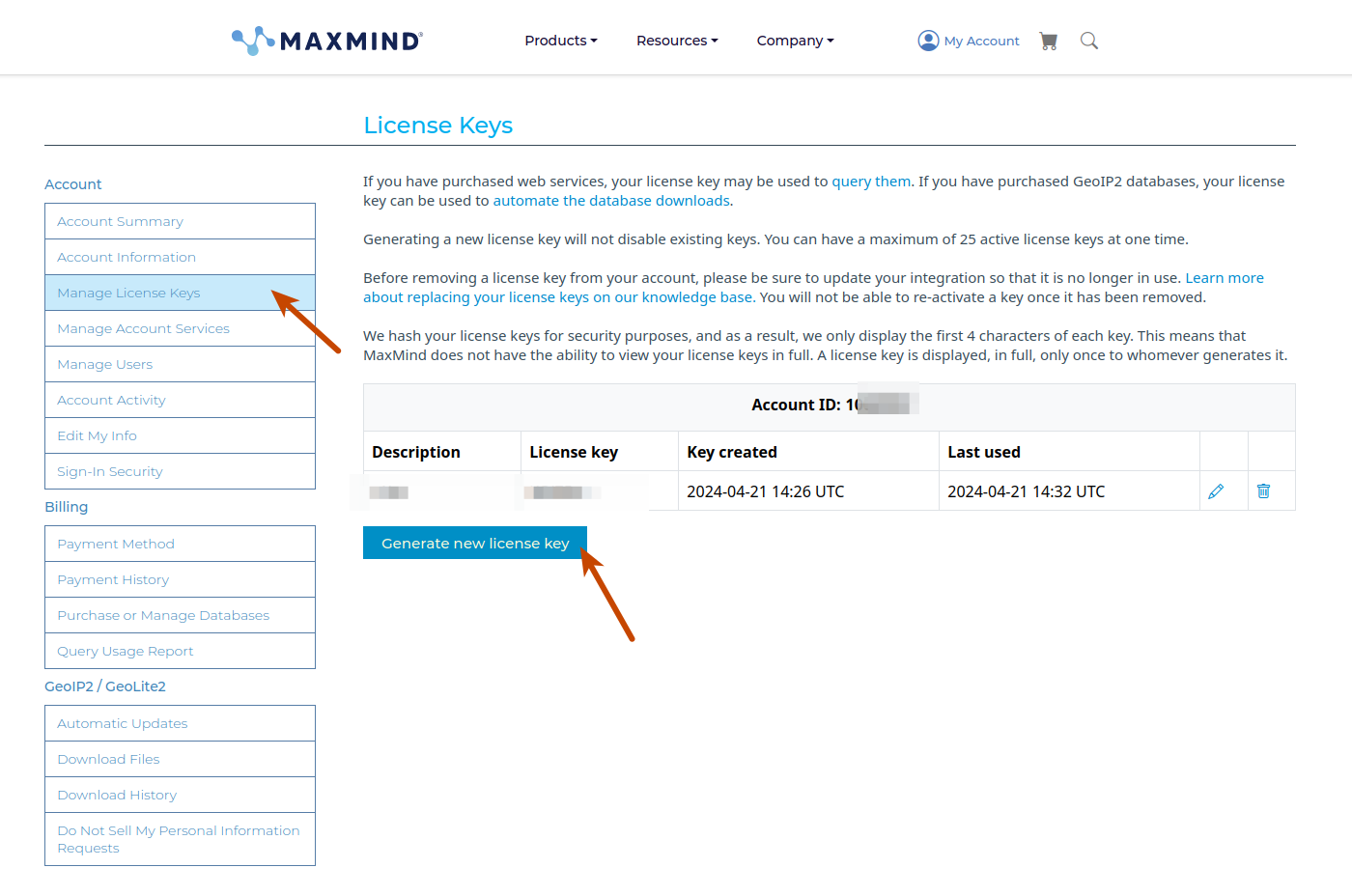
After license created the system will give you link to download GeoIP.conf file with the contents like
# GeoIP.conf file for geoipupdate program, for versions >= 3.1.1.
# Used to update GeoIP databases from https://www.maxmind.com.
# For more information about this config file, visit the docs at
# https://dev.maxmind.com/geoip/updating-databases.

# AccountID is from your MaxMind account.
AccountID 10****0

# LicenseKey is from your MaxMind account
LicenseKey KOi75o_hR***********************s_mmk

# EditionIDs is from your MaxMind account.
EditionIDs GeoLite2-ASN GeoLite2-City GeoLite2-Country
You need to put this into file on your server
nano /etc/GeoIP.confAfter this will be done, you need to update the database as
$ sudo geoipupdate -v

geoipupdate version 4.6.0
Using config file /etc/GeoIP.conf
Using database directory /var/lib/GeoIP
Performing get filename request to https://updates.maxmind.com/app/update_getfilename?product_id=GeoLite2-ASN
Acquired lock file lock (/var/lib/GeoIP/.geoipupdate.lock)
Performing update request to https://updates.maxmind.com/geoip/databases/GeoLite2-ASN/update?db_md5=00000000000000000000000000000000
Performing get filename request to https://updates.maxmind.com/app/update_getfilename?product_id=GeoLite2-City
Acquired lock file lock (/var/lib/GeoIP/.geoipupdate.lock)
Performing update request to https://updates.maxmind.com/geoip/databases/GeoLite2-City/update?db_md5=00000000000000000000000000000000
Performing get filename request to https://updates.maxmind.com/app/update_getfilename?product_id=GeoLite2-Country
Acquired lock file lock (/var/lib/GeoIP/.geoipupdate.lock)
Performing update request to https://updates.maxmind.com/geoip/databases/GeoLite2-Country/update?db_md5=00000000000000000000000000000000
After this you can see the GeoIp database
$ sudo ls /usr/share/GeoIP/
GeoIP.dat  GeoIPv6.dat
Then you can use this databases as described in the project GitHub
– https://github.com/maxmind/geoip-api-php
You need to install composer package
composer require geoip/geoip:~1.16and then you can use the installed database as follow
require 'vendor/autoload.php';

$gi = geoip_open("/usr/local/share/GeoIP/GeoIP.dat",GEOIP_STANDARD);

echo geoip_country_code_by_addr($gi, "24.24.24.24") . "\t" .
     geoip_country_name_by_addr($gi, "24.24.24.24") . "\n";
echo geoip_country_code_by_addr($gi, "80.24.24.24") . "\t" .
     geoip_country_name_by_addr($gi, "80.24.24.24") . "\n";

geoip_close($gi);
Actually, that’s all what is needed to fix the legacy code. If you need to use GeoIP with your new project it makes sense to use the newer implementation – GeoIP2, see details here
- https://dev.maxmind.com/geoip/docs/databases?lang=en
- https://dev.maxmind.com/geoip/geolite2-free-geolocation-data
- https://github.com/maxmind/GeoIP2-php


